Claude Code permissions: modes, rules, and what none of them checks

Claude Code permissions decide which tool calls run without asking you. A permission mode sets the default, and allow, ask and deny rules override it per tool or per command pattern. Every one of these settings checks the action against a policy. None of them checks the action against what you asked for, and that gap is where an agent runs the command you told it not to run. This post covers the modes, the rules, the bypass flag, and the check that is missing.
Permission modes
A mode is the session-wide answer to "what runs without a prompt". The permission modes documentation lists six:
| Mode | What runs without asking |
|---|---|
default (labeled Manual) |
File reads inside your working directories, and actions that need no approval |
acceptEdits |
Reads, file edits, and common filesystem commands such as mkdir, touch, mv, cp |
plan |
Reads and read-only commands; Claude explores but does not edit your source files |
auto |
Everything, with background safety checks before actions such as shell commands and network requests |
dontAsk |
Reads and pre-approved tools only; anything that would prompt is denied |
bypassPermissions |
Everything, immediately: prompts and safety checks are off |
Press Shift+Tab to cycle modes during a session; the status bar names the active one. Set defaultMode in a settings file to choose the mode new sessions start in, or pass --permission-mode on the command line. dontAsk is the locked-down option for CI and scripts: nothing new gets approved, so a run cannot wander outside the tools you pre-approved.
Permission rules
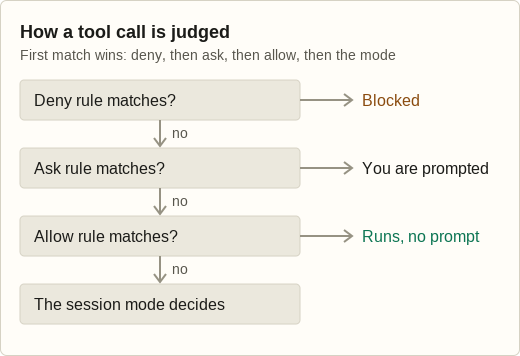
Rules are the fine-grained layer: an allow list, an ask list and a deny list, each naming a tool or a pattern inside one. They live in the permissions block of a settings file, and /permissions shows every rule with the file it came from. Three properties of the evaluation order matter:
- Deny wins, then ask, then allow. The first match in that order decides. A broad deny like
Bash(aws *)blocks a call even when a narrower allow likeBash(aws s3 ls)also matches; an allow rule cannot carve an exception out of a deny. - A bare tool name removes the tool. A deny rule naming just
Bashtakes the tool out of Claude's context entirely, so it is never offered. - Changes apply from the next call. Editing rules in
/permissionsmid-turn takes effect at Claude's next tool call.
A Bash rule matches the command text. * matches any text including spaces; a rule without * matches one exact command. Put the * after the subcommand, so the words before it limit the rule:
{
	"permissions": {
		"allow": ["Bash(npm run *)", "Bash(git commit *)"],
		"deny": ["Bash(git push *)"]
	}
}
This runs npm scripts and git commits without asking and refuses commands that begin with git push. Read and Edit rules use gitignore-style path patterns instead: Read(~/Documents/*.pdf) names files from your home directory, Edit(/src/**/*.ts) names paths relative to the settings file's project. WebFetch(domain:example.com) scopes network fetches to one domain. The permission rules reference has the full syntax.
Repeated permission prompts
When Claude Code keeps asking for permission for commands you trust, the cause is almost always a missing allow rule: the mode prompts for each shell command family that no rule covers. The fixes, in order of scope:
- Add an allow rule for the family you trust, such as
Bash(npm run *), in the project's.claude/settings.json. - Switch to
acceptEditswhen the work is mostly file edits you are reviewing anyway. - Use
automode, where it is available, to let background safety checks auto-approve routine actions instead of you.
Each step trades oversight for speed. The last section of this post is about what none of them buys.
The bypass flag
claude --dangerously-skip-permissions starts a session in bypassPermissions mode; it is exactly equivalent to --permission-mode bypassPermissions. This is how people allow all permissions at once, and the name is honest about the risk: prompts and safety checks are off, and tool calls execute immediately, including writes to protected paths.
It does not skip everything. The documentation lists actions no mode auto-approves, and they still prompt or deny under bypass: tools matched by an explicit ask rule, tools that require user interaction, and recognized rm or rmdir commands aimed at critical paths such as the filesystem root, your home directory, or your working directory. A small floor remains; the rest of the guardrails are gone.
What no permission checks
Permissions are the part of Claude Code security that decides what runs. A permission system answers "may this action run"; it does not answer "is this action what the developer asked for". Those come apart in two ways.
A pattern is not the intent. The deny rule above catches git push origin main. It does not catch git -C . push, which the documentation names as a command the rule does not match. Every pattern covers the spellings it matches and nothing else; a rephrased command slips past. Enforcement by pattern is a fence, not a proof.
Allowed actions still break stated rules. In a study of 20,574 coding-agent sessions in 1,639 repositories (Tang et al., EMNLP 2026), the largest group of failures was the agent violating an explicit constraint: 38.33% of the 16,118 episodes where the developer had to push back. The share was higher in command-line sessions than in editor sessions:
| Session type | Constraint violations, share of episodes |
|---|---|
| CLI sessions | 49.49% |
| IDE sessions | 32.26% |
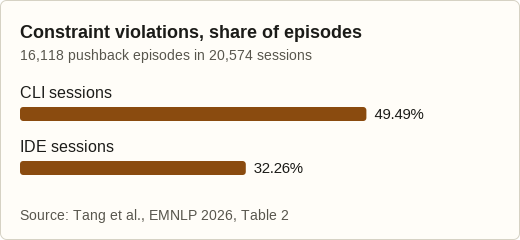
These violations happen inside actions the permission system allowed. The agent ran a permitted command that contradicted a sentence the developer had written.
Besydr (say: besider) is a program that runs beside a coding agent and adds the missing check on Claude Code's own hooks: a call that conflicts with your words can be denied, with your sentence as the reason, and an authorizer — a separate model call that judges each tool call against your intent — checks every call. It lives under the same limit as any pattern guard, and the hooks tutorial shows the mechanism and where it stops. The benchmark has the measured numbers; the local program is free with octomind and needs a licence with Claude Code after a trial.
Sources and method
- Modes, rules, evaluation order and the bypass flag: the permission modes, permissions and CLI reference pages, read 2026-11-29.
- The study is Tang et al., EMNLP 2026; its shares were read from Table 2. One episode can carry several labels.
- This post was drafted with AI assistance from these sources.