Besydr 0.5.0: memory MCP and fetch MCP tools, checks across messages

Besydr runs beside a coding agent such as Claude Code, Codex, OpenCode, pi or octomind. It checks the agent's claim that the work is done, stops tool calls that go against what you said, and learns lessons from your sessions for later ones. Version 0.5.0 gives the agent two tools it can call itself, a memory MCP tool and a fetch MCP tool, both served by one new command. The completion check now follows one request across every message you send while the agent works, keeps waiting for Claude Code's background work when you type in between, and asks for a check of every case a requirement lists. Your config file does not change.
A memory MCP and fetch MCP server: besydr mcp
MCP, the Model Context Protocol, is the protocol through which an agent calls tools that another program offers. besydr mcp is such a program. It works as a memory MCP server and a fetch MCP server in one: it offers the agent two tools, memory and fetch, over standard input and output.
Both tools are free with every client, also after the trial: the server checks no licence. It reads and writes files directly, so it needs no running Besydr server. Besydr's supervision does not need the tools, and the tools do not need it.
besydr install does not add the server to a client. You add it once, by hand. To add the MCP server to Claude Code:
claude mcp add besydr -- besydr mcp
claude mcp list
With Claude Code 2.1.282 and a test build given by its full path, the two commands printed:
Added stdio MCP server besydr with command: /path/to/besydr mcp to local config
Checking MCP server health…

besydr: /path/to/besydr mcp - ✔ Connected
That is Claude Code's own connection check; no tool was called from a conversation in that run. According to Claude Code's MCP reference, a Claude Code MCP server added this way belongs to the local scope, so it is set for the project folder the command ran in. --scope project or --scope user changes that.
To add the MCP server to Codex:
codex mcp add besydr -- besydr mcp
Codex CLI 0.101.0 printed Added global MCP server 'besydr'. and wrote this entry to its config.toml, the form the Codex MCP page describes for a server started by a command:
[mcp_servers.besydr]
command = "/path/to/besydr"
args = ["mcp"]
codex mcp list then showed the server as enabled. No tool was called from Codex in that run.
OpenCode takes a local MCP server as an entry in opencode.jsonc. This entry follows OpenCode's MCP servers page and was not run:
{
	"$schema": "https://opencode.ai/config.json",
	"mcp": {
		"servers": {
			"besydr": {
				"type": "local",
				"command": ["besydr", "mcp"]
			}
		}
	}
}
Octomind's default agents start the server themselves and send their role and working directory with every request. For any other client, a call belongs to the folder the client started besydr mcp in. When an action cannot be done, the agent gets a tool result marked as an error, with a sentence that says why. The command line page has the details.
What fetch returns: passages, lines or the full text
fetch reads a URL or a local file: HTML, Markdown, plain text, PDF and DOCX. One call takes up to 10 sources.
| Parameter | What comes back | Limit per call |
|---|---|---|
query |
The passages that match the meaning of a question, each with the headings it stands under and its relevance in percent | 5 passages by default, at most 10, each at most 1,500 characters |
pattern |
The lines a regular expression matches, with their line numbers; context adds up to 5 lines before and after each |
100 lines, the lines around a match counted in |
| neither | The full text, with the offset to continue from | 40,000 characters, shared between the sources |
Relevance says how close a passage is to the question in meaning. The exact words of the question count too, so a name or an error code is found where it stands.
To show what each way costs in text, one page was read all three ways: Claude Code's MCP reference, which fetch reported as 178,291 characters.
| Call | What came back | Characters returned | Share of the page |
|---|---|---|---|
no query, no pattern |
The first part of the text and the offset to continue from | 40,223 | 22.6% |
pattern: "claude mcp add", context: 1 |
The matching lines with one line around each | 7,092 | 4.0% |
query: "how do I add a local stdio server" |
5 passages, relevance 66% to 71% | 6,169 | 3.5% |
query: "recipe for apple pie with cinnamon" |
One sentence saying no passage matches | 120 | 0.07% |
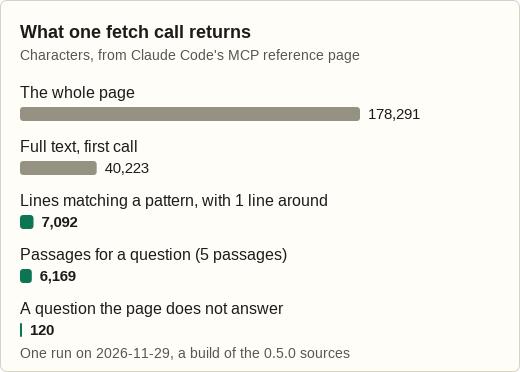
Reading the whole page without a query takes five calls of 40,000 characters. The passage with the highest relevance was the section "Option 3: Add a local stdio server", which is the answer to the question.
A PDF is read the same way, so besydr mcp also serves as a PDF MCP server. The paper Attention Is All You Need came to 39,544 characters of text. The question "how many attention heads does the base model use" returned one passage of 1,264 characters at relevance 84%. It holds the sentence "In this work we employ h = 8 parallel attention layers, or heads."
One call can look across several pages. The same kind of question, put to the MCP pages of Claude Code, Codex and OpenCode in one call, returned 5 passages from two of the three pages: 6,706 characters, relevance 77% to 82%.
These numbers come from one run on 2026-11-29 with a build of the 0.5.0 sources on Linux: three pages and one PDF, all in English, each call made once. They show the size of these answers, not how good the passages are on other pages. For a page in another language, see the limits below.
A passage far from the question in meaning is left out, unless it holds all the words of the question. When none is left, the answer is one sentence: No passage is close to the query in meaning or holds all its words. Reword the query, or leave it out to read the text. When one of several sources cannot be read, the others are returned, followed by a line such as Not read: <source>: HTTP error: 404 Not Found. When none can be read, the call is an error that gives the reasons.
A page is saved on your machine after the first read. A URL is asked again when its saved copy is older than one hour, and a local file is read again when it changed. A saved page nobody used for 30 days is deleted.
The search by meaning uses an embedding model: a model that turns a text into numbers, so that texts of similar meaning get similar numbers. It is the model Besydr already uses for lessons, and it runs on your machine. No text of yours leaves the machine: fetch sends the request for the URL itself and, once, downloads the model.
What memory searches and stores
memory is one tool with four actions. search finds what is known about a topic, show returns one entry in full, store keeps a note for later sessions, and delete removes a note.
A search reads three stores and labels each entry with the store it came from:
| Store | Who wrote it | Checked | What the tool can do with it |
|---|---|---|---|
| Notes | An agent, with store |
By nobody | Search, show, store, delete |
| Lessons | Besydr, from your past sessions | Against the session the lesson came from; the label says when a lesson is an assumption that was not verified | Read only |
| Project docs | You: the Markdown files under .box/ at the root of the repository, except the README.md at its top |
Not by Besydr | Read only |
In a test project with one stored note, one file under .box/ and no lessons yet, a search with two questions, "how do we format API errors" and "how long does a login token live", returned this:
[note, stored by an agent and not checked] id: 20261129143605-decision-of-2026-11-29-every-api-error-i (this project, relevance 81%)
API errors use problem+json
Decision of 2026-11-29: every API error is returned as application/problem+json with a type URL. Do not add another error shape.
tags: api, decision

[project doc] .box/decisions/auth.md > Auth decisions > Tokens (relevance 75%)
## Tokens

Access tokens last one hour. Refresh tokens last thirty days and rotate on every use.

[project doc] .box/decisions/auth.md > Auth decisions > Sessions (relevance 65%)
## Sessions

A session is bound to one device and ends when the refresh token is revoked.
One call takes up to 5 questions. Each is scored by itself and an entry keeps its best score, so a search about two subjects finds both, as above. A search returns 4 entries of each store by default and at most 10. An entry shows up to 600 characters; show returns the rest. An entry far from every question in meaning is left out, unless it holds all the words of one. A search for "recipe for apple pie with cinnamon" in the same project returned Nothing found.
A note holds up to 4,000 characters, a title, tags, and a scope: this project, or every project. When a new note replaces older ones, store can name them, and they are deleted.
The difference between a note and a lesson
Besydr checks a lesson against the session it came from before it keeps it. A note is whatever the agent wrote, and nobody checked it.
Notes are files in memory/<project>/ in Besydr's data directory, and in memory/_/ for the notes that hold in every project. You can read them and delete them by hand. Nothing that works on lessons reads these folders. A note is never given to a later session unasked, never promoted to every project, never turned into a generated rule, never moved to the archive and never sent to a team. An agent gets a note only when it searches for it, and the result marks it as a note that was not checked.
Notes an agent stores describes the difference in full.
A completion check that follows a request across your messages
The completion check is Besydr's comparison of what the agent did with what you asked. It runs when the agent stops. It works from a checklist: the observations that would show your request is fulfilled, which Besydr writes from the request before any work.
Before 0.5.0, a request was one message and the turn it started, a turn being everything the agent does until it stops. The count of checks started again with every message you typed. Now every message you send while the agent works or waits joins the open request. The check reads all those messages in order, the checklist, the evidence gathered so far and every final answer the agent gave.
What a joining message does to the checklist depends on what it is. Besydr's main model sorts it into one of three kinds:
| Your message | Example | Effect on the checklist |
|---|---|---|
| A status question or an acknowledgement | "How far are you?", "ok" | None |
| A self-contained instruction | "Also update the README" | Its conditions are added |
| A follow-up that rewrites the request | "Skip the migration, only do the API" | A rewritten checklist replaces it, which can add and withdraw requirements |
If that call fails, because the model cannot be reached or answers in a form Besydr cannot use, the checklist stays as it was. The text of your message is still kept with the request.
The limit of three checks now counts per request, not per turn, and the note for thin evidence is given once per request. A request closes when a turn ends with nothing pending and the check asks for no further pass. The next message you type opens a new one. An open request is saved with the session, so it survives a restart of the Besydr server. This holds for all clients; How it works has the details.
Background tasks in Claude Code
Claude Code can leave work running when the agent stops: a background shell command, a subagent, a monitor, a workflow. It reports that work at each stop, and the completion check waits for whatever started while the request was open. In 0.5.0:
- Typing during the wait. A message you type while that work runs joins the request and no longer ends the wait. Before, the message cleared the wait, and the check ran at the next stop with the work still running.
- Reports from subagents. A subagent's report coming back to the main agent counts as a notification, not as a message from you. It opens no new request and does not end the wait for other work that is still running.
- A job whose report never comes. When a job is gone from Claude Code's list and no report arrived, Besydr releases it after two further turns have started without one, and writes its id to
hook.log.
Work that was already running when the request opened, such as a dev server, does not hold the check. A named teammate the request started stays pending until it reports idle or is stopped.
Codex, OpenCode and pi report no background work, so every turn end of yours is checked there. Octomind counts pending work across its session. Clients lists what each client reports.
A check for every case a requirement lists
One condition of a checklist can list several cases, for example "rejects an empty name, a name over 64 characters and a duplicate name". Before 0.5.0, one check that hit one case could settle the whole condition. Now a condition counts as exercised only when the recorded commands and their output show a check for every case it lists.
The cases without a check are named to the agent in a note, one line per condition:
- Condition 2: <the requirement>. No check covers: <case>; <case>. <what the check observed>
The note tells the agent to write and run the missing checks and to fix what fails. It is advice, given once per request: it does not block the turn, and the check runs once more afterwards. The setting unsettled_advisory switches the note off. This holds for all clients.
Config page: short labels, On and Off, percentages
The Config page of the record page, the page besydr ui opens in your browser, arrived in 0.4.0. In 0.5.0 its form changed in four places:
- Each setting shows a short label and the first sentence of its comment. An
ibutton beside it opens the full comment. - A setting that is on or off is two buttons, On and Off, where there was a list with
trueandfalse. - A unit in a setting's name moves beside the input:
timeline_daysreads "Timeline", withdaysafter the number. - The two settings that are a share between 0 and 1,
noise_marginandcost_allowanceunderlearning.evolution, are shown as a percentage with a slider. The file still stores 0 to 1, so 0.29 shows as 29. Save refuses a value outside the range.
Limits
besydr installdoes not registerbesydr mcp. You add it to each client by hand.fetchreads public pages only. It sends no credentials and does not run JavaScript, so a page that needs a login or builds its text in the browser is not read.- A source may be up to 50 MB, and a URL has 30 seconds to answer.
- The embedding model is trained on English text. In a check on one German and one Russian page, the questions the page answers were found, but three questions it does not answer got a passage back as well. Leaving out what does not match works on English pages only.
- Nobody checks a note, and a note never reaches a session unasked.
memoryreads a team's lessons on macOS and Linux only.- A search by meaning needs the embedding model on the machine. If Besydr has not loaded it there yet, it is downloaded once: about 30 MB from
huggingface.co. - The completion check waits for background work only where the client reports such work: Claude Code and octomind.
- The server was registered with Claude Code and Codex as shown above. The OpenCode entry comes from its docs and was not run.
Upgrading to 0.5.0
besydr update installs 0.5.0 when your licence includes it, and Besydr also checks once a day by itself. A copy installed with Homebrew is upgraded with brew upgrade besydr.
The config file stays at version 3: no setting was added, renamed or removed, so nothing is upgraded.
After the update, run besydr restart. Then restart OpenCode and pi sessions, which keep one connection to Besydr for the whole session, and octomind sessions that were running during the update. Downloads and the full list of changes are on the Releases page.